
We don’t sell the AI.
We make it valuable & safe.
Your customers pick Claude, Copilot, Mistral, Gemini or ChatGPT themselves. The value is in what that AI can reach, what it is allowed to see and who is accountable for its actions. That is the security, network and identity stack we sell, integrate and support.
Which AI does your customer use?
platform


 + runZero · ExtremeCloud IQ · Sophos · SolarWinds
The model is the engine.
We build the roads, locks and licence plates.
Every AI vendor sells intelligence. None of them can see the other AI tools your people use, connect safely to your whole multi-vendor stack, or give agents an identity your auditors accept. That gap is where Kappa Data comes in.
What you get from the AI platform alone — and what we add
| Customer question | Claude alone | + Kappa Data stack |
|---|---|---|
| Can the AI answer questions about our network, identities and vulnerabilities? | ~Only if someone wires up connectors | ✓MCP to runZero, JumpCloud, Cato, XIQ … |
| Who may use which connector, and with whose credentials? | –API keys per user, in the AI client | ✓JumpCloud AI Gateway: per group, per tool, OAuth |
| Do we see all AI tools in use, including shadow AI? | –Only its own app | ✓Barracuda & Cato discover every GenAI app |
| Can we stop a card number or source code from being pasted into a prompt? | ~Inside its own tenant, if licensed | ✓Inline prompt inspection & DLP across every AI tool |
| Are the APIs our agents call protected against abuse? | –Out of scope for the model | ✓Barracuda API Protection: discovery, bots, DDoS |
| Does every agent have an owner, an identity and an expiry? | –Agents run on shared service accounts | ✓JumpCloud Agentic IAM |
| Can we prove it to an auditor (NIS2, EU AI Act, ISO 27001)? | ~Fragmented logs per tool | ✓Central tool-call & prompt audit logs, access reviews |
MCP connections
Your whole stack in one AI conversation, through one governed gateway.
JumpCloudrunZeroCato 02 · PROTECTAI Security
Shadow AI discovery, prompt inspection and DLP before data leaves.
BarracudaCato 03 · SECUREAPI Security
Agents act through APIs. Discover, protect and rate-limit every one.
Barracuda 04 · GOVERNAgentic IAM
Agents become identities with an owner, access rules and an end date.
JumpCloudAsk your whole stack
one question.
MCP lets an AI assistant talk directly to vendor platforms. You ask in plain language, the assistant picks and calls the right tools itself. Pick a scenario and watch it run through the JumpCloud AI Gateway.
Every user × every MCP server
doesn’t scale. One gateway does.
Drag the sliders to size your customer. Without a gateway every user stores API keys for every server in their AI client, with no central overview.
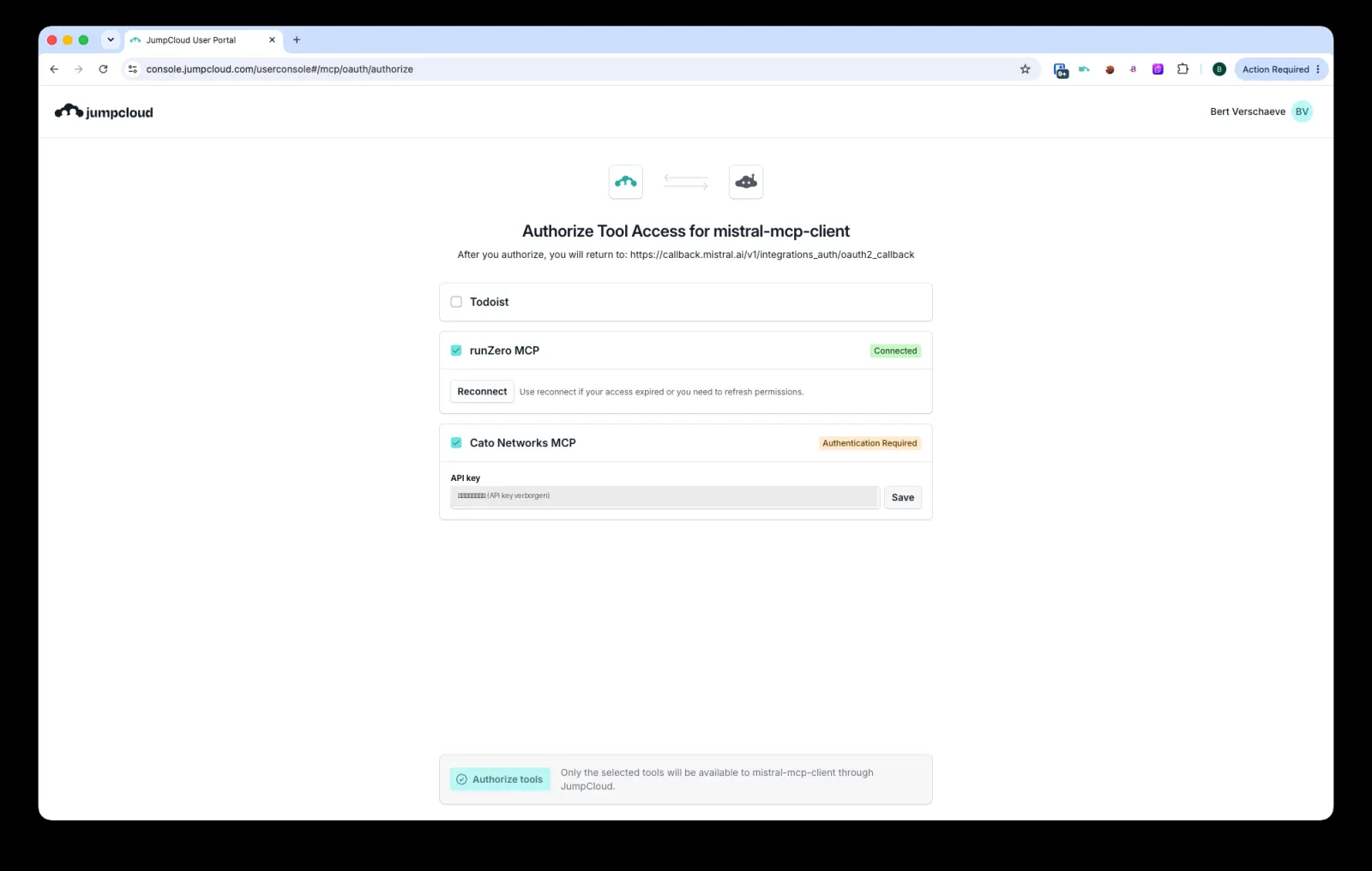
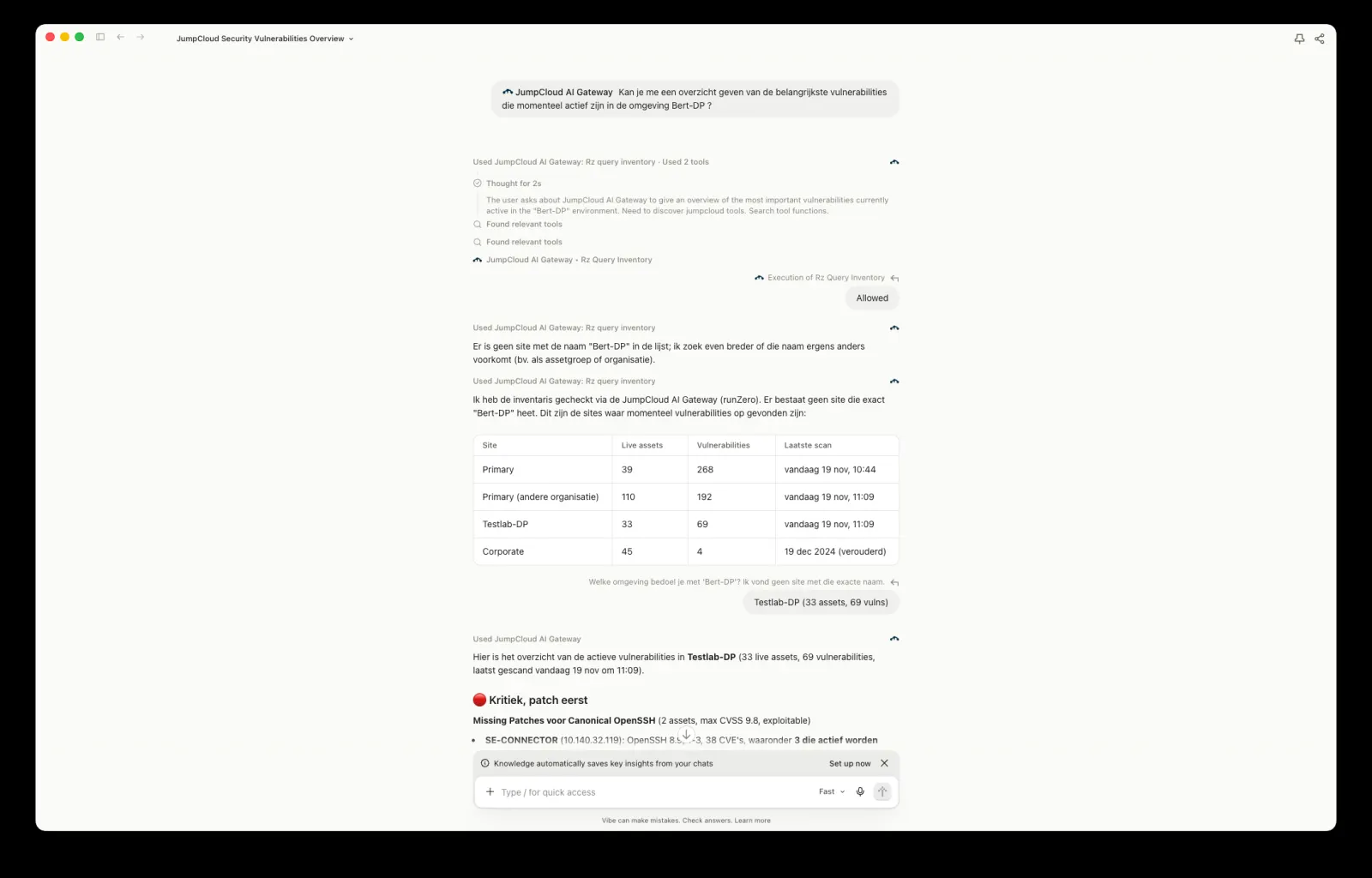
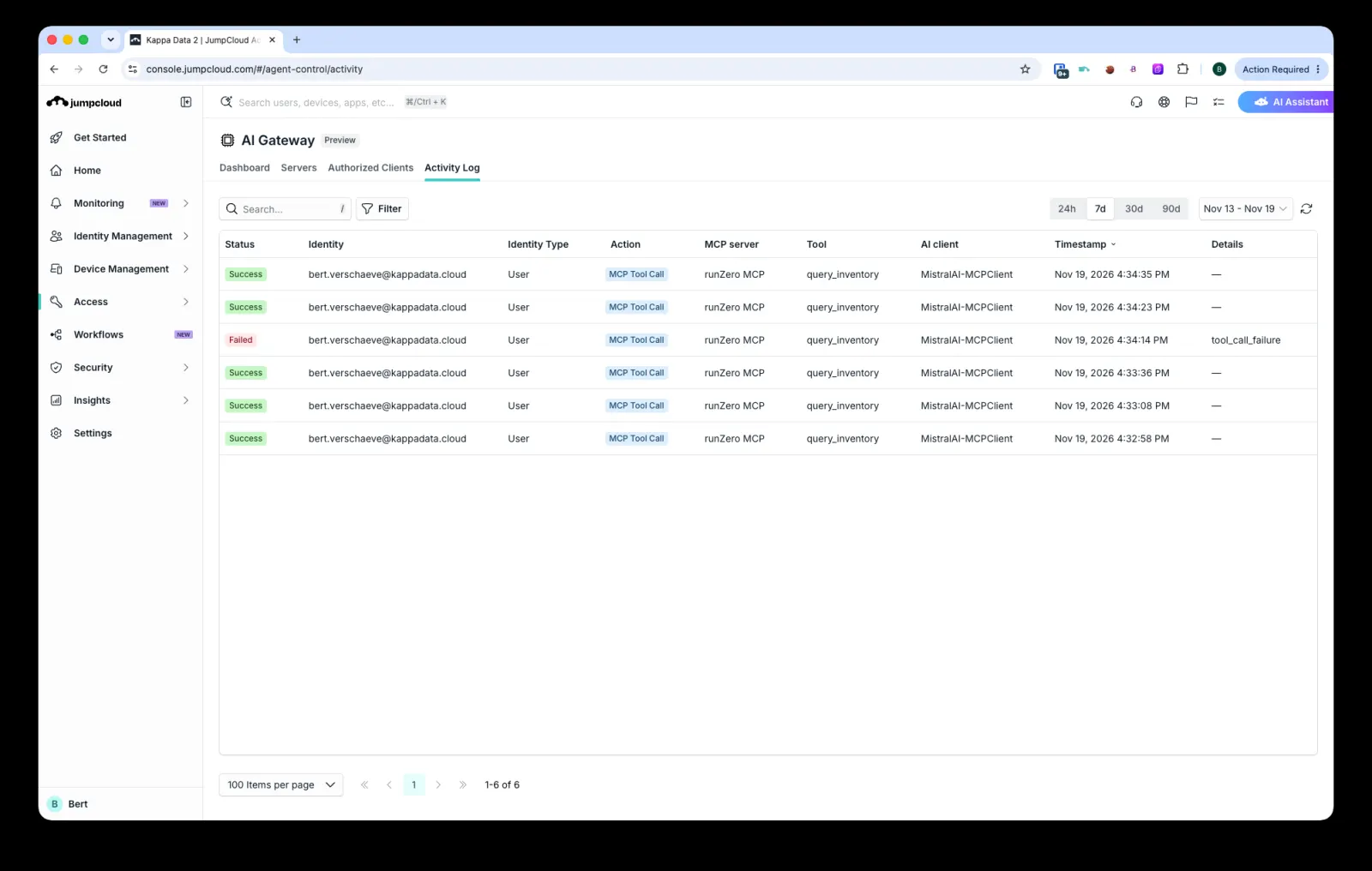
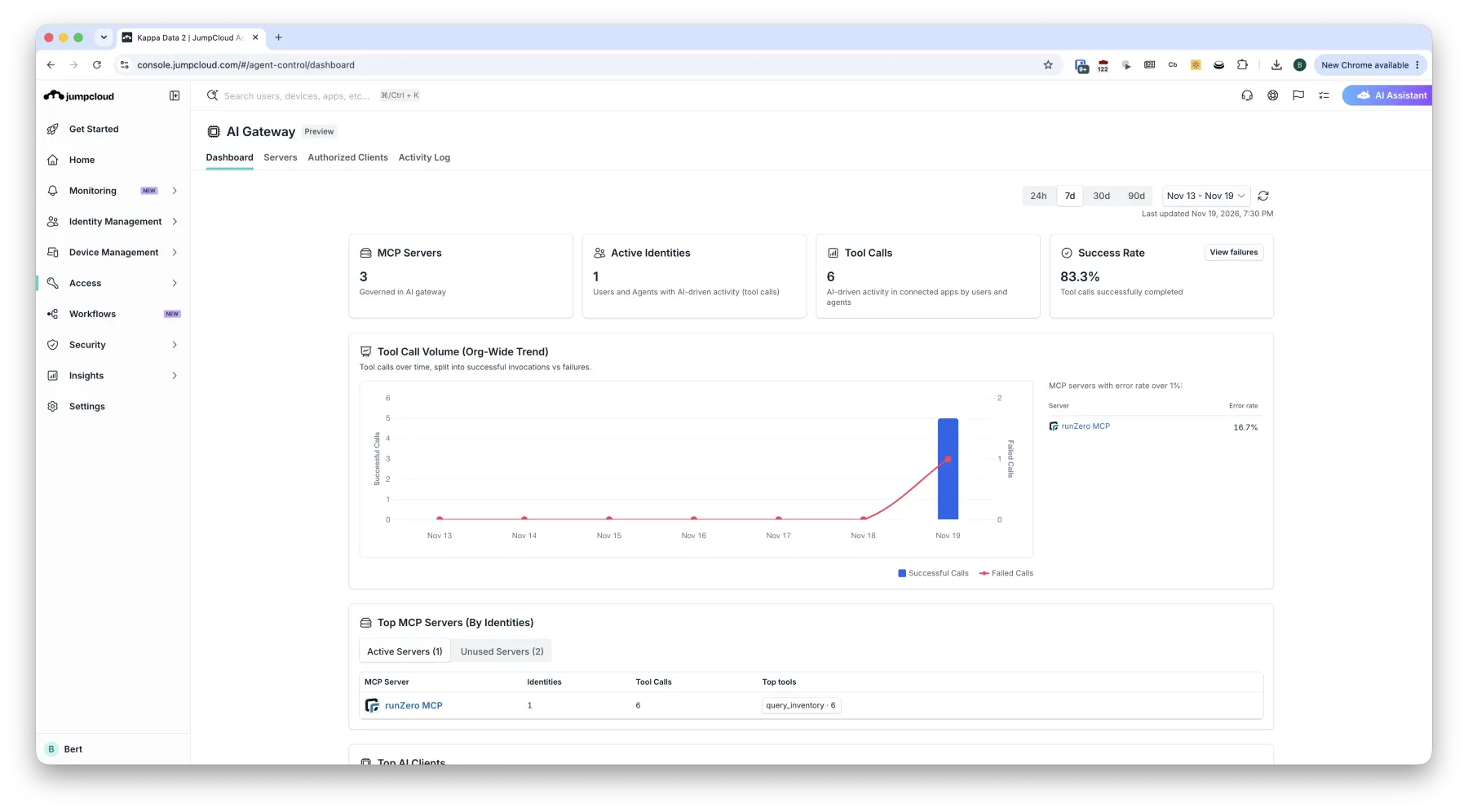
How the gateway works, in the JumpCloud console
The user authorises their tools
- Sign in through the JumpCloud User Portal (OAuth)
- Only MCP servers allowed for the user’s group are shown
- The user ticks which tools the AI client may use
- Vendor credentials stay in JumpCloud, never in the AI client
 Enlarge
Ask questions through one connector
- The AI client sees one connector: JumpCloud AI Gateway
- The gateway routes to the right tool, e.g. runZero
query_inventory - Every tool call still asks the user for confirmation
 Enlarge
Full visibility for IT & security
- User identity, AI client, MCP server and tool
- Status and timestamp — including failed calls
- Evidence for NIS2 and EU AI Act logging requirements
 Enlarge
One dashboard for people and agents
- MCP servers governed by the gateway
- Active identities: users and agents
- Tool-call volume, success rate, top servers and tools
 Enlarge
From API docs to a governed tool in days
- API docs — the vendor’s OpenAPI spec or REST documentation
- Generate — an AI coding agent writes the MCP server (Claude Code, GitHub Copilot, Google Antigravity, Mistral Vibe)
- Test — connect it to your AI client with real questions
- Share — publish it centrally behind the JumpCloud AI Gateway
Example: our own MCP server for ExtremeCloud IQ answers “which SSIDs are live in De Pinte?”
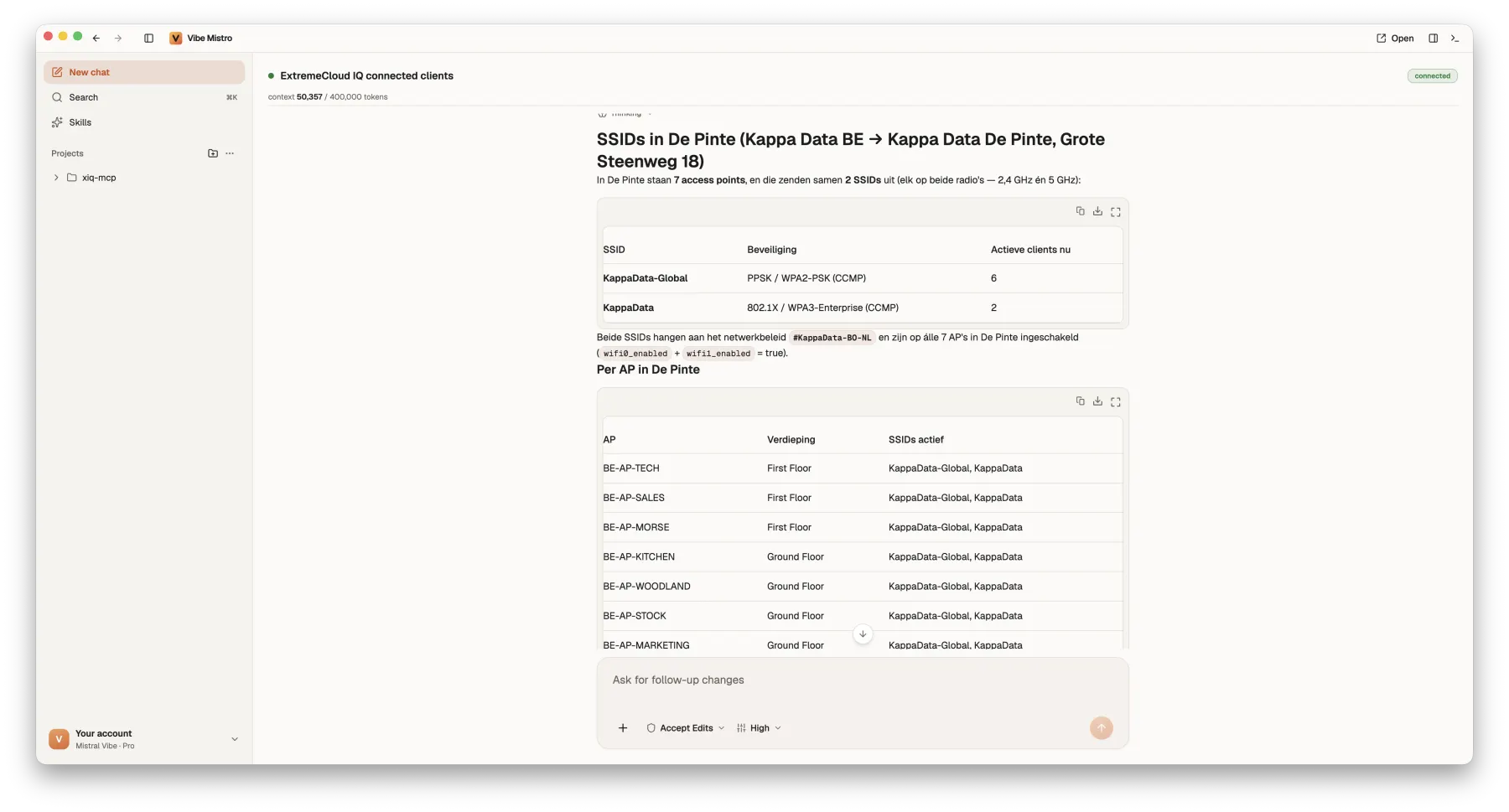 Enlarge
⚠︎ Community MCP servers (e.g. for Sophos Central or Barracuda CloudGen Firewall) are often unvalidated. We review the code, the credentials they need and their write actions before use.
See every AI tool.
Stop sensitive data before it leaves.
Employees paste customer data, credentials and source code into whatever AI tool is closest. Barracuda and Cato inspect prompts and uploads inline, across every GenAI app — not just the one you licensed.
Prompt inspection lab
Runs locally in your browser — illustrates the policy “Protect-Sensitive-Data-in-AI”1 · Which AI tool is the user on?
| Time | User | AI tool | Action | Disposition | Prompt |
|---|---|---|---|---|---|
| The prompt audit log fills as you send prompts. | |||||
This isn’t a slide. It’s running.
One user, one afternoon in our KD Testing tenant: 47 AI requests discovered, Microsoft Edge Copilot and ChatGPT blocked, Gemini allowed with prompt inspection — and every prompt containing a bank card number denied and audited.
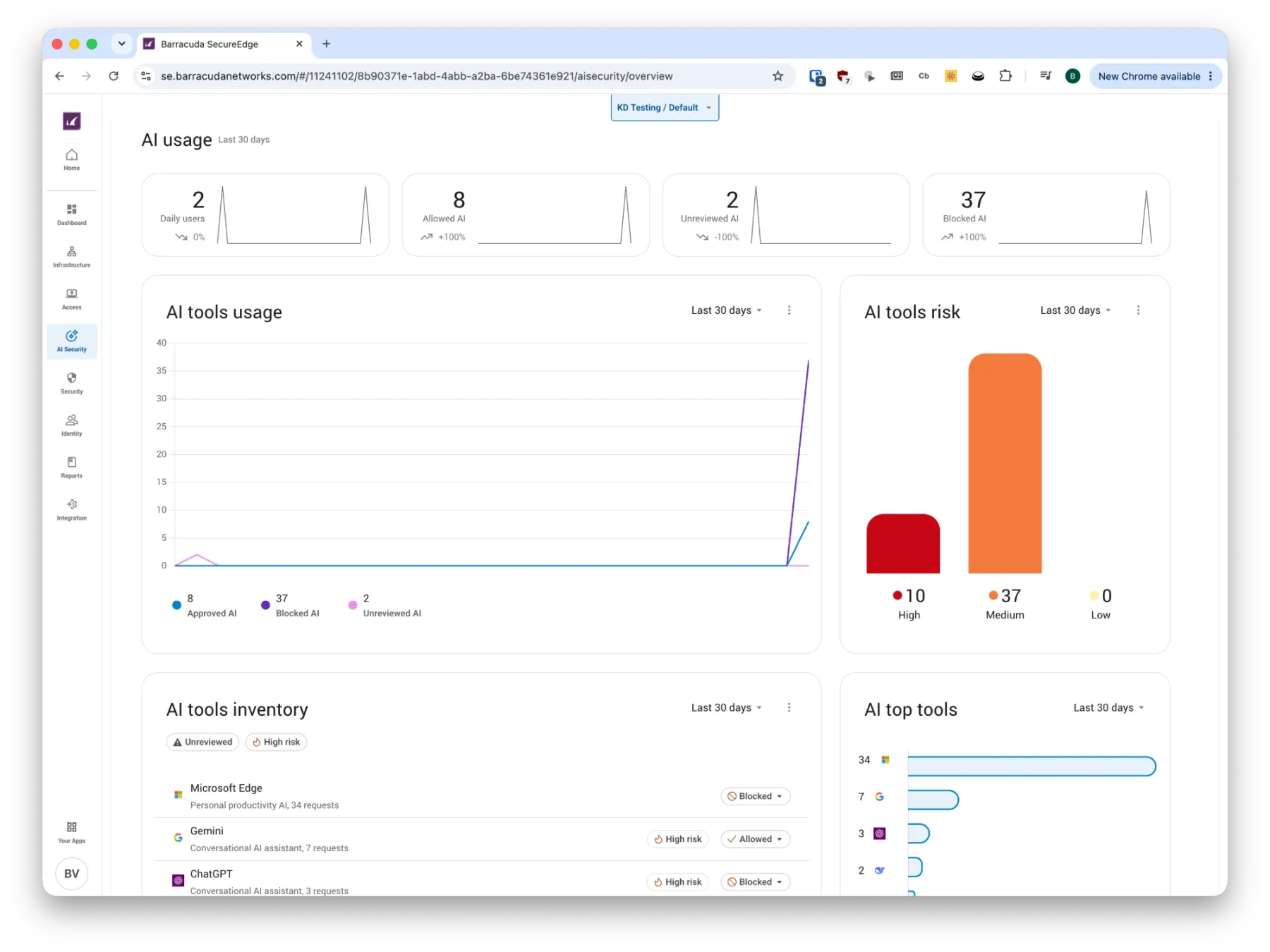 Enlarge
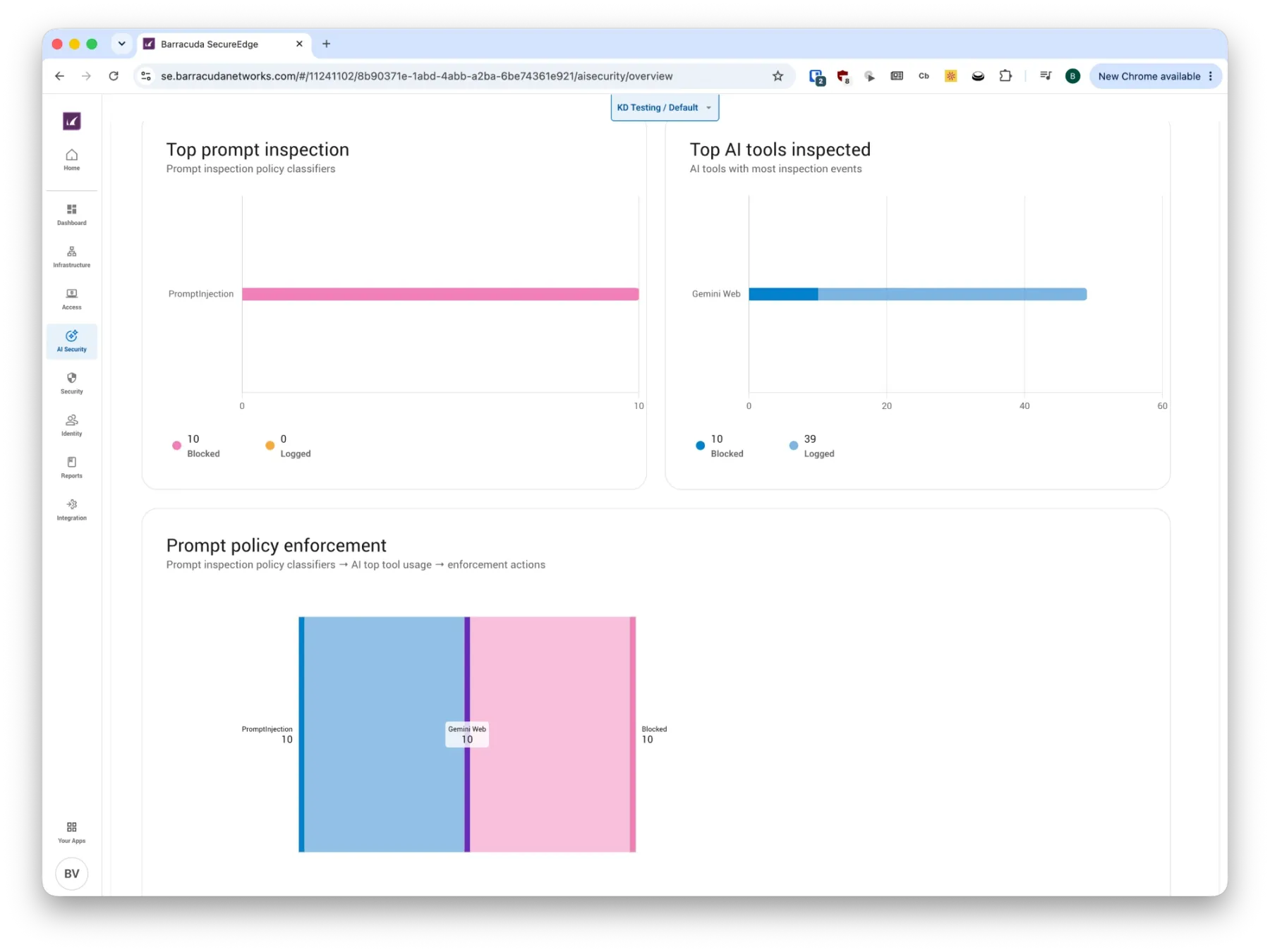 Enlarge
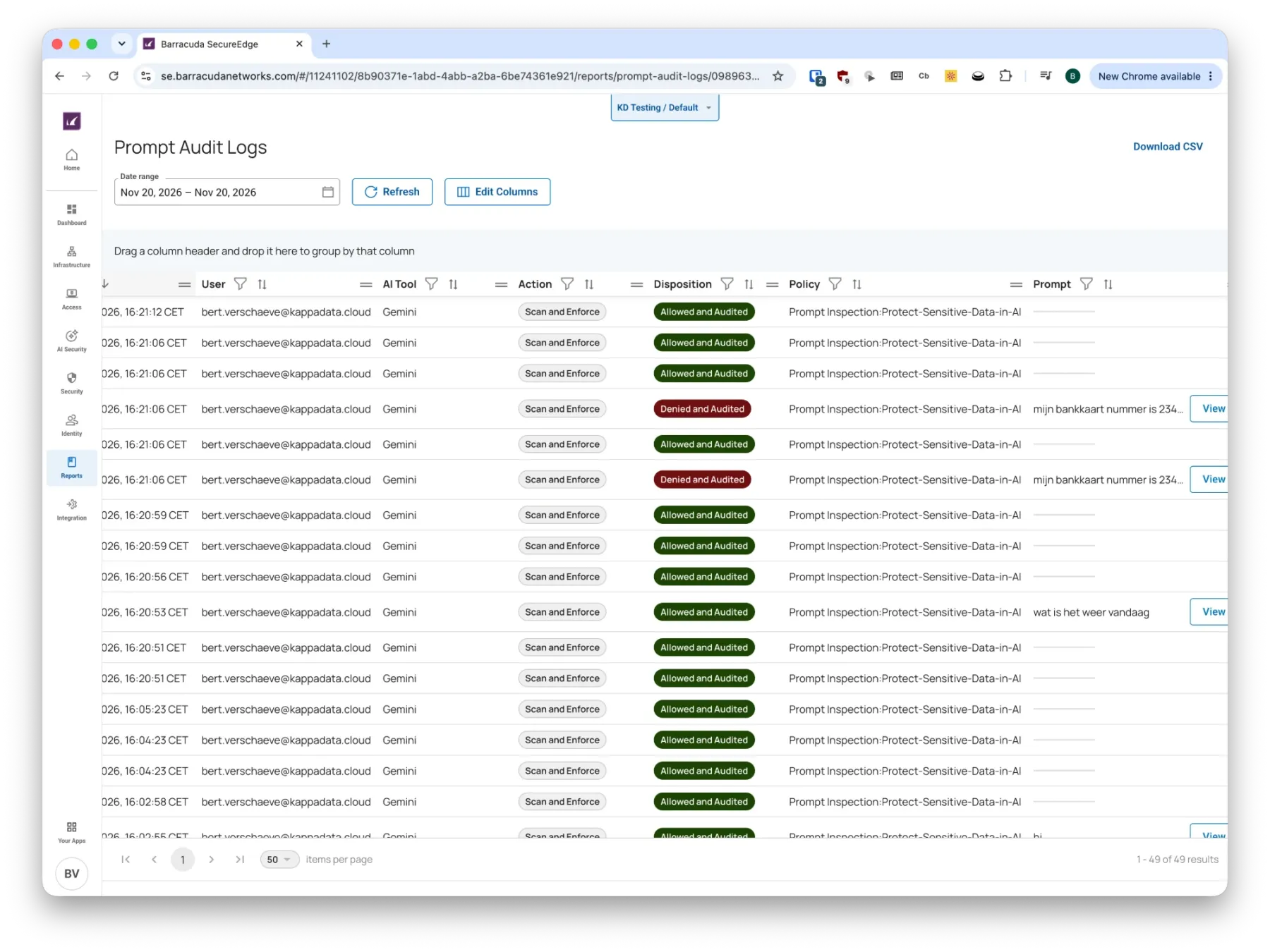 EnlargeBest for lean IT teams
Barracuda AI Security
See, guide, accelerate: make AI adoption visible, governed and safe — delivered inside BarracudaONE, without enterprise minimums.
- Shadow AI discovery with a risk classification per AI service
- Approve, block or guide users to sanctioned tools
- AI Data Security: real-time inspection of prompts & uploads
- Prebuilt detectors: PII, credentials, source code, payment cards, health data
- Block or warn before data reaches the GenAI tool
- Exportable, audit-ready evidence for insurers and auditors
- Bailey AI assistant to build policies in plain language
Best for SASE customersCato AI Security
One cloud-native platform for how employees use AI, the AI apps you build and the agents you run — part of the Cato SASE Cloud.
- Shadow AI dashboard and a catalog of 950+ GenAI applications
- GenAI DLP with ML-based classifiers, including source code
- Inspection of prompts and responses with real-time guardrails
- Protection of home-grown AI apps against prompt injection & jailbreaks
- Discovery of local agents and connected MCP servers
- Runtime protection for prompts, outputs and tool calls
- Same policy engine for every site, user and device
Agents don’t click.
They call APIs.
Every MCP tool, every agent action and every AI integration ends up as an API call. More agents means more traffic, more endpoints — and more forgotten “zombie” APIs. Barracuda API Protection discovers and defends them all.
Part of Barracuda Application ProtectionWhat stops what
Agents are identities too.
With JumpCloud, an AI agent gets its own identity — with a human owner, its own authentication, group-based access and a full lifecycle. See every agent. Govern every identity.
Click through the lifecycle of an agent
People vs. agents, one rulebook
Users, devices, certificates and agents follow one set of policies, groups and audit logs. Disable an agent without touching its human owner.
No more zombie agents
Time-boxed access requests and recurring access reviews make sure agents lose access the moment they’re no longer needed.
Act, not only read
JumpCloud exposes IAM, PAM, MDM and assets via MCP: onboard, offboard, change access or lock a device from a conversation — with confirmation per call.
What is your customer
worried about?
Tick what you hear in the meeting. We’ll map it to the right play, the products and a sentence you can use on the spot — then copy the summary into your follow-up mail.
Recommended plays 0
Tick one or more customer concerns.
More value from the stack.
Less cost around it.
Fewer tools to buy
IdP, MDM, PAM, PKI, RADIUS and AI governance in one platform instead of separate licences.
Fewer integrations
One governed MCP connection instead of point-to-point integrations, API keys and scripts per tool.
Less time per task
Troubleshooting, onboarding and reporting in one question instead of hopping between consoles.
Lower compliance cost
Logging, access reviews and attestation reports built in — audit evidence in minutes, not weeks.
From first workshop
to governed production.
Workshops
Hands-on sessions on MCP, AI security and agent governance with your stack.
Integrations
Vendor MCP connections and the JumpCloud AI Gateway, set up and tested.
Custom servers
MCP servers on top of vendor APIs that don’t have one yet.
Vetting & policy
Community-server reviews, read-only scopes, prompt-inspection and DLP policies.
One connection. Access per group. Every prompt and tool call visible.
Want to see it live? We demo the full story end to end — MCP, prompt inspection, API protection and agent identities — on your use cases.